Hysteria 2 / Android 11+ / no root

Your own server,
on your phone.

Hy2droid is an Android app that connects the phone to a server running Hysteria 2, a protocol for getting around blocked or throttled networks. It is only the phone side: the server address — a share link or a QR code — comes from whoever runs that server. Once connected, the traffic of your apps leaves through it. Needs Android 11 or newer; no root, no Google account, no configuration file.

Android 11+ IPv4 + IPv6 No root AGPL-3.0 latest · releases
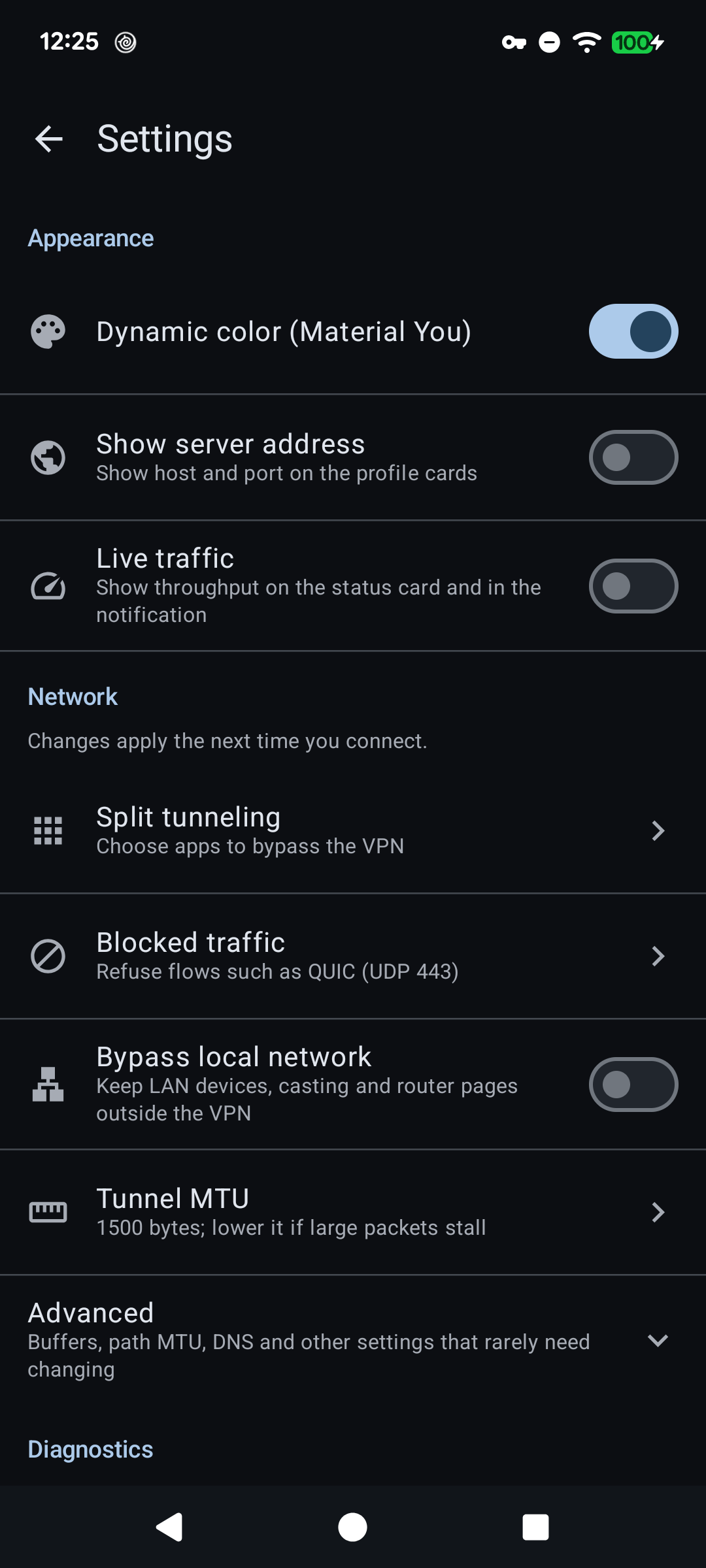
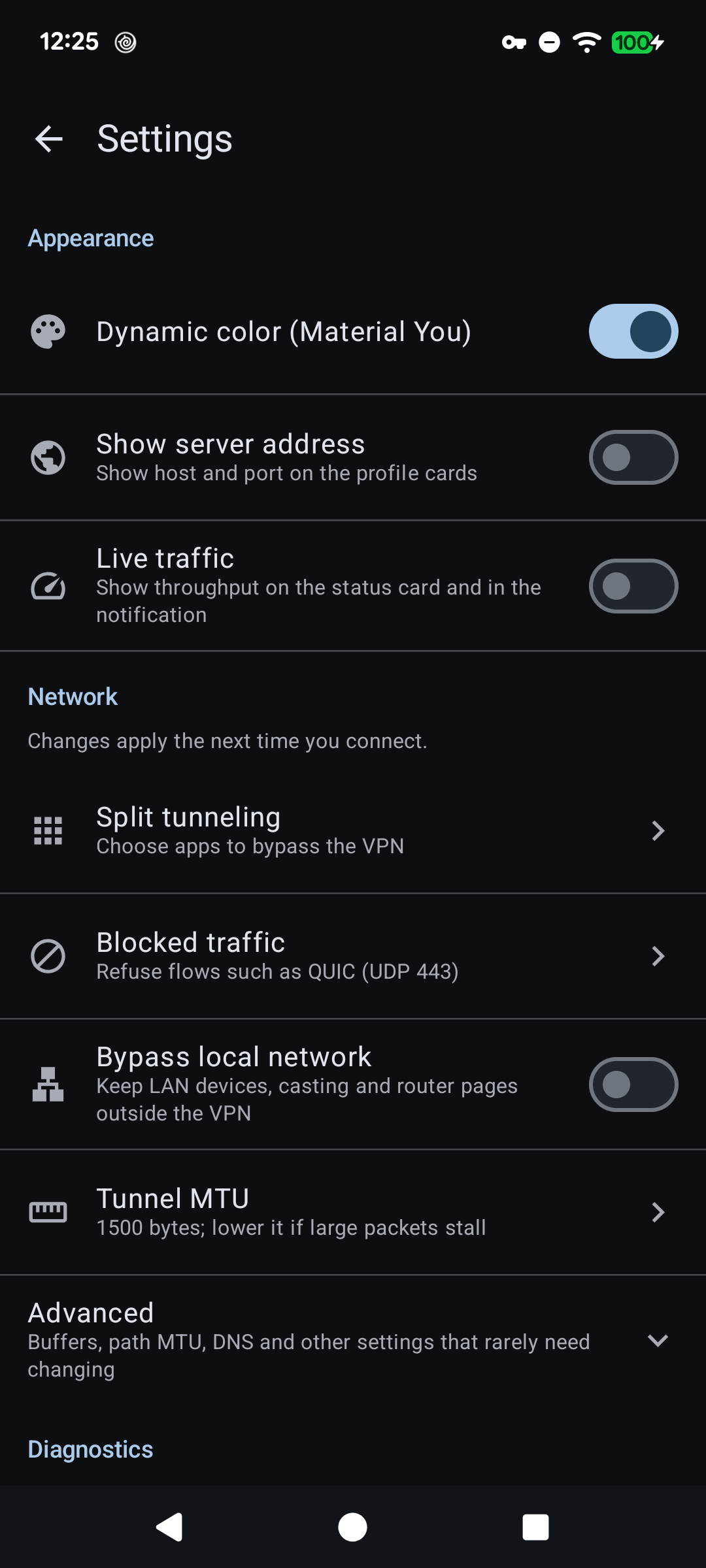
Settings screen with network controls
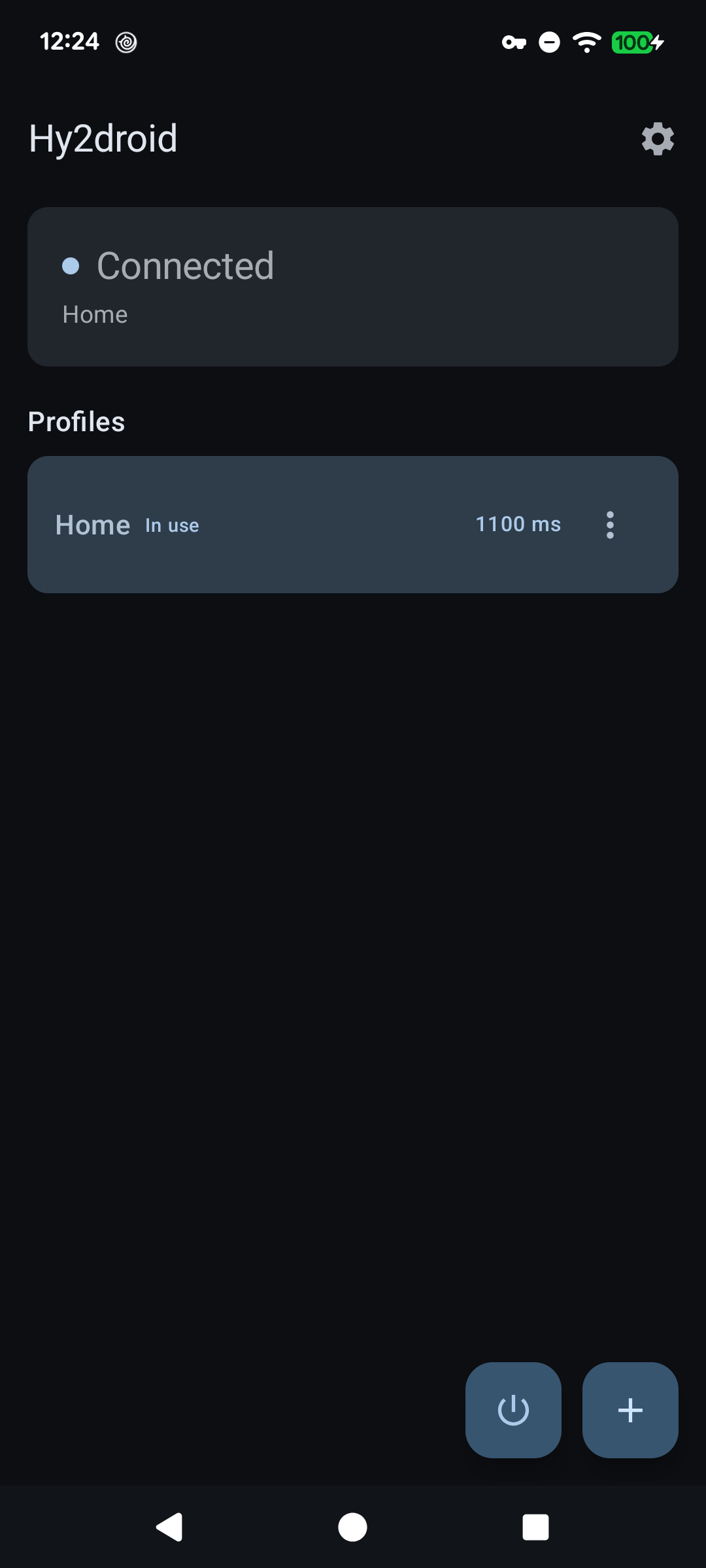
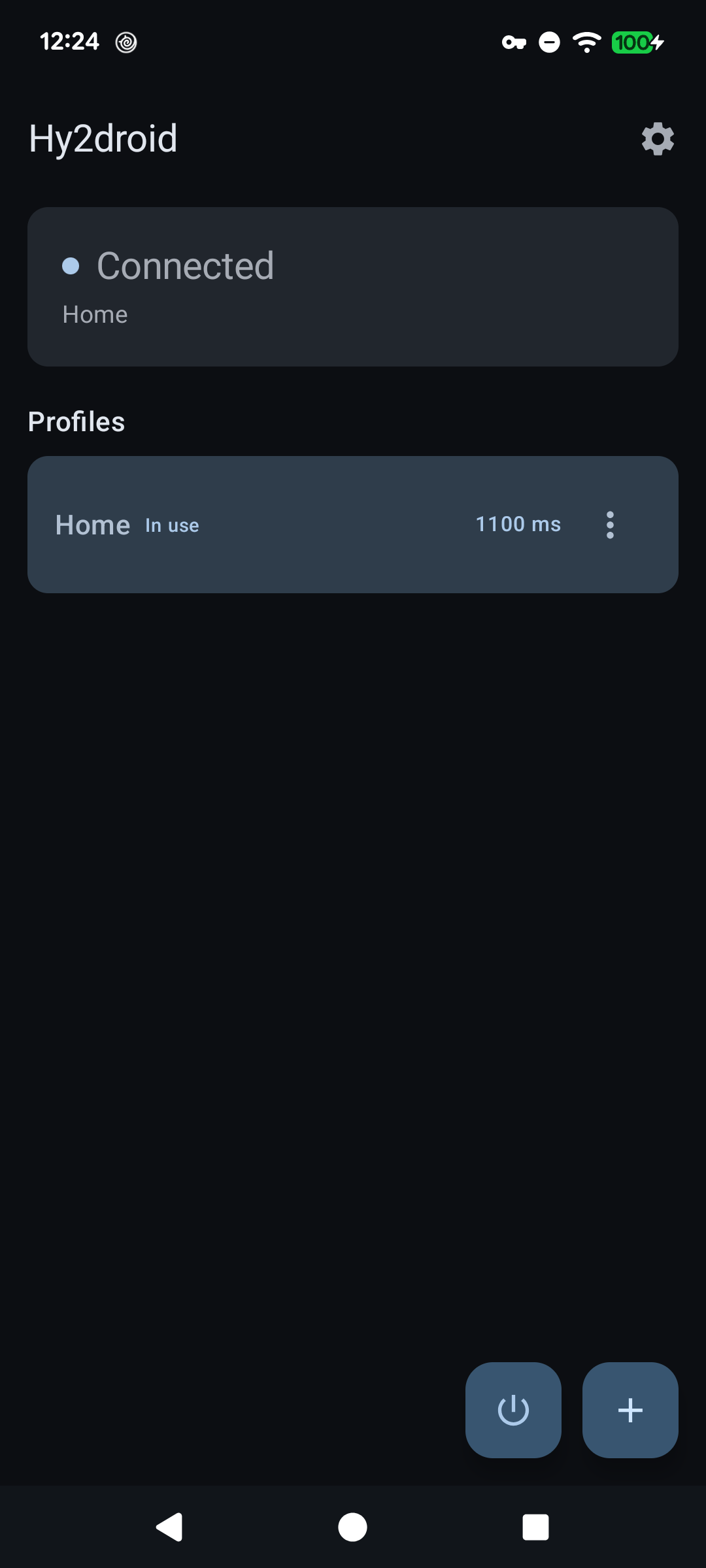
Home screen showing a connected tunnel and saved profiles

What it does

Add a server, press connect, and the phone's internet traffic leaves through it. The home screen shows whether the connection is up, how much data has moved, and — when it fails — which step failed.

Add a server

Paste a hysteria2:// link, scan a QR code with the camera (no network involved), or open a link in the browser and let it hand the server to the app. The app calls each saved server a profile. Switching servers while connected rebuilds the connection.
IPv4 and IPv6

The connection carries both kinds of address. The server field takes a hostname or an address, and the port has its own field.

Choose apps

Pick apps that should not use the connection. On Android 13 and newer, local-network traffic can stay local, so printers, NAS boxes and casting keep working.

Errors say what failed

When a connection fails, the status card says what failed: the name did not resolve, TLS failed, the password was rejected, or nothing came back. Diagnostics can add a test and a redacted log export.

No account, no tracking

Servers you add stay in the app's private storage. There is no account, no analytics, no crash reporting and no update check.

Known limits

Hysteria 2 only. One server is one share link: no subscription URL, and no in-app updates — new versions come from Releases. The default name lookup returns IPv4 addresses only, so IPv6-only sites need “Answer DNS in the tunnel” turned off. The app blocks QUIC (the transport HTTP/3 uses, on UDP port 443) by default; the Blocked traffic screen changes that.

Screens

The whole app is two screens: the status and your saved servers, and the settings behind the gear.

Home screen: a Connected status card naming the profile Home, above a Profiles list where Home is marked In use with a 1100 ms latency reading, and the power and add-profile buttons at the bottom right.
Home: whether the tunnel is up, which server it uses, and how long that server takes to answer.
Settings screen: an Appearance section with Dynamic color, Show server address and Live traffic, then a Network section with Split tunneling, Blocked traffic, Bypass local network and Tunnel MTU, under the note that changes apply the next time you connect.
Settings: appearance, then the network options that take effect on the next connect.

Server addresses

A server field that takes a hostname, an IPv4 address or an IPv6 address, next to a separate port field (default 443).

2001:db8::1 an IPv6 literal is a valid server address

Brackets are not needed in the app. The server and the port are two fields, so a bare IPv6 address is unambiguous. A share link that carries a bracketed address is read the same way.

  • Literals and names. A hostname is resolved with the system resolver; an IPv4 or IPv6 literal is used as given.
  • A and AAAA both work. A node that publishes only AAAA is reachable over IPv6; one that publishes only A is reached over IPv4.
  • Names with both records use IPv4. The bundled client asks for the IPv4 address and does not retry over IPv6, so use an AAAA-only name or the IPv6 address when IPv4 is the broken side.
  • The network must reach that family. An IPv6-only server needs IPv6 on the phone's current network; an IPv4-only network cannot reach one. If a family silently fails, the diagnostic export is the place to look.

Install from Releases

Signed APKs built by CI from this repository. No account or store is involved.

HY2DROID latest Android 11+ · arm64 recommended · signed release

Download

Use arm64-v8a on a modern phone. The universal APK is larger but runs on every supported ABI; arm32 and x86 splits are on the release page.

Allow the install

Android asks once whether the browser or file manager may install unknown apps. That permission can be revoked afterwards.

Add a profile

Open the app, tap +, then paste a share link or scan the QR code from your provider. Nothing is uploaded anywhere.

Connect

Accept the VPN prompt, which appears once per app. Android 17 also asks for local-network access once; refusing still lets public nodes work.

Expect: the app opens on an empty home screen after installing, and after connecting the status card and the notification report the same state. A failure names the step that failed.

Check the file before installing. Every release publishes SHA256SUMS.txt next to the APKs. In the download directory run sha256sum -c SHA256SUMS.txt --ignore-missing (it skips the splits you did not download), then apksigner verify --print-certs app-arm64-v8a-release.apk and compare the Signer #1 certificate SHA-256 digest with the value below. On the phone, an app such as AppVerifier shows the same digest for an installed APK.

Debug and release use different keys. Android refuses to update one with the other; uninstall the debug copy first. Release signing certificate SHA-256: af:9c:2f:a9:ac:ff:cd:5a:f4:d0:a2:d7:92:4e:c4:51:85:11:8a:df:37:ee:eb:a3:8e:4d:da:54:7d:d4:bf:9b

Technical details

For people who want to verify before installing.

Package
us.leaf3stones.hy2droid
Version
latest
Requires
Android 11 (API 30) or newer
Target
Android 17 (API 37)
ABIs
arm64-v8a, armeabi-v7a, x86_64, x86 (+ universal)
Core
Hysteria 2, official Go core bundled
Licences
In the app: Settings → About → Open source licenses
VPN
Android's built-in VPN service (VpnService), IPv4 + IPv6
Languages
7 — English, Arabic, Spanish, French, Russian, Simplified Chinese (the six official UN languages) and Traditional Chinese
License
AGPL-3.0 (source included in the repository)

Questions

Requirements, downloads and known limitations.

Is it free?

Yes. Hy2droid is free software under AGPL-3.0. The full source, build scripts and release workflow are in the repository. You pay only for your own server, if you run one.

Does it work with IPv6-only and IPv4-only nodes?

Yes, as long as the phone's current network can reach that family. An IPv6 address goes in the server field as it is, and AAAA-only names work. For a name with both records the bundled client uses IPv4 and does not retry over IPv6, so use an AAAA-only name or the IPv6 address when IPv4 is the broken side.

Which APK should I take?

arm64-v8a covers almost every phone from the last several years. armeabi-v7a is for old 32-bit devices, x86_64 for emulators and a few tablets, and the universal build works anywhere but is larger.

Android says “App not installed”. Why?

Almost always a truncated download or an older copy signed with another key. Re-download from the release page; if that does not help, uninstall the previous build (a debug APK cannot be updated by a release APK).

Why do IPv6-only websites not load with the default DNS mode?

The default answers A queries inside the tunnel and has no AAAA answers by design. For IPv6-only destinations, turn off “Answer DNS in the tunnel” in Settings → Network → Advanced and use forwarded resolvers. This does not affect connecting to IPv6-only servers.

Does it need root or Google Play Services?

Neither. It uses Android's built-in VPN service (VpnService), so it works on de-Googled ROMs. The QR scanner uses CameraX and ZXing locally; no network service is involved.

Is it on Google Play?

No. Every release is a signed APK on GitHub Releases; installing one needs the one-time “install unknown apps” permission for the browser or file manager you download it with.

Hysteria 1 or other protocols?

Hysteria 2 only. This is deliberately a focused client: a profile is the handful of values a share link carries, not a general proxy configuration.